 prawel.pl
IRC client · iPhone & iPad
IRCpug
Connect to multiple IRC networks on iPhone and iPad, with searchable local history, IRCv3 support, and bouncer integration.

Overview
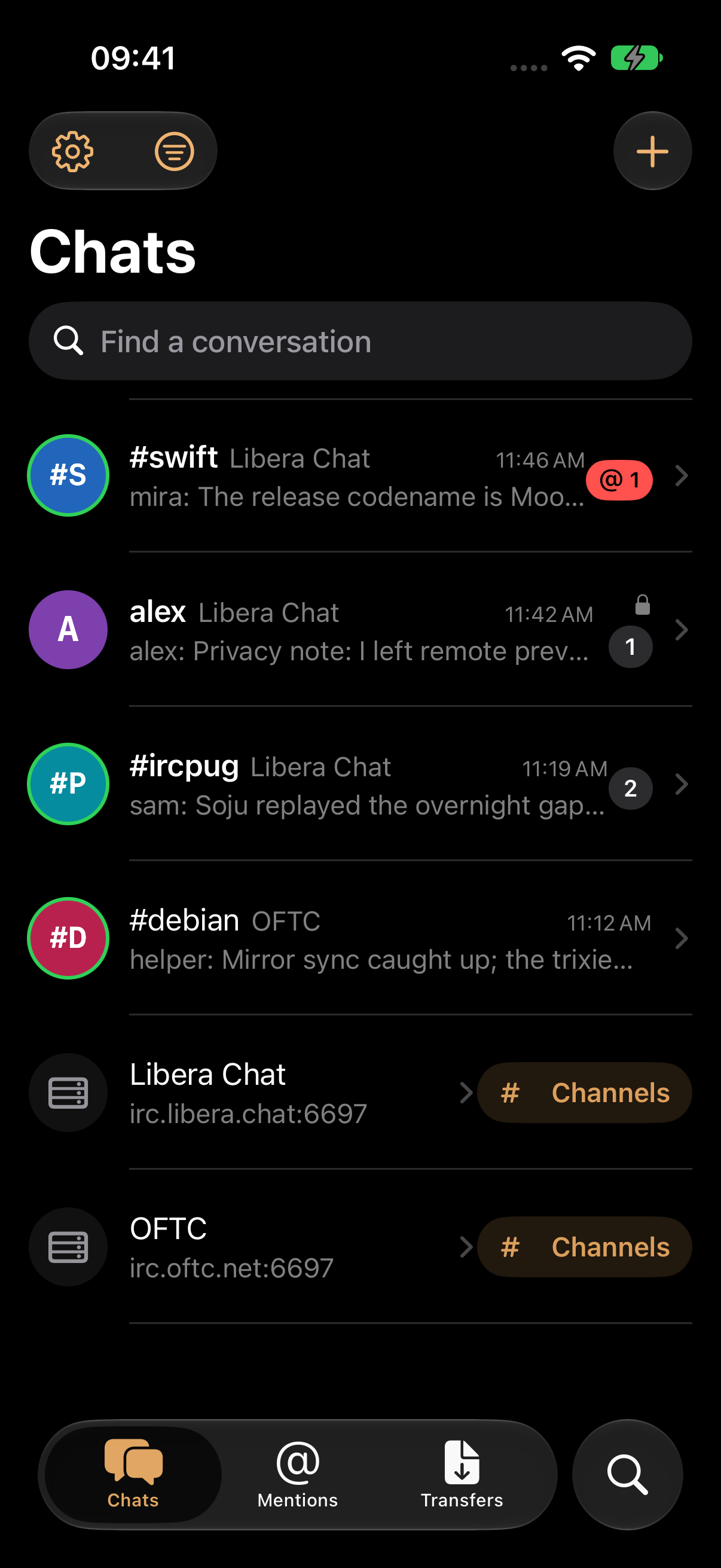
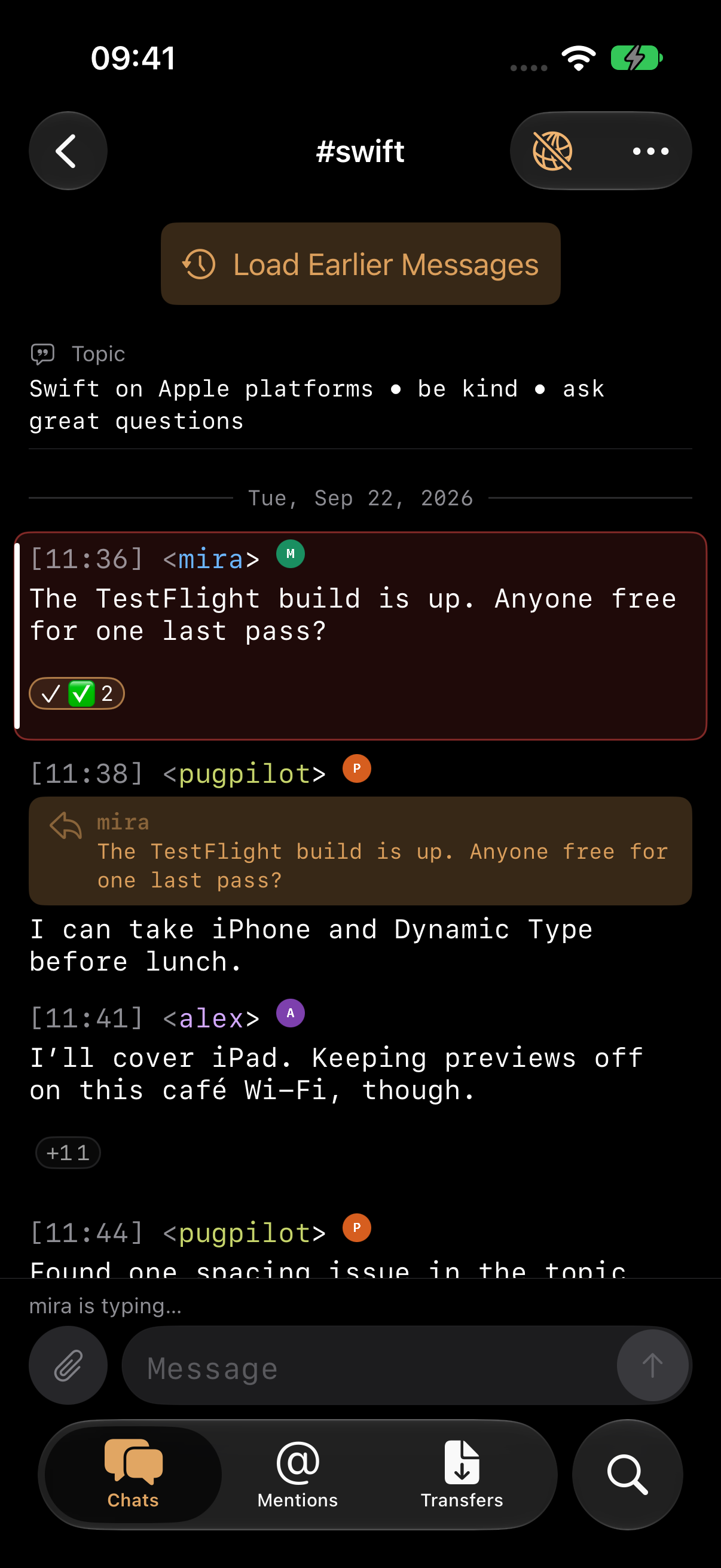
IRCpug brings a system-native workspace to a protocol with decades of history. Connect to multiple IRC networks over TCP, TLS, STARTTLS, or WebSockets; authenticate with modern SASL mechanisms; keep channel and query history searchable on device; and use current IRCv3 features including message history, replies, reactions, read markers, multiline messages, and metadata. Bouncer integration, proxy routing, notification rules, moderation tools, file transfers, command help, and deep per-network controls support serious IRC use without hiding the protocol underneath.
Design decisions
IRC connections can run for hours, but iOS limits background activity. Reconnecting needs to restore channel state and history without duplicating messages or sending stale commands.
- 01
Expose connection details
Capability negotiation, connection state, raw traffic, read markers, and destination-specific failures stay inspectable instead of being hidden behind a generic chat surface.
- 02
Fail closed around secrets
Credentials live in Keychain, insecure fallbacks require explicit choices, and stale connection work cannot send after disconnect, reconnect, or profile removal.
- 03
Make history useful locally
A durable SQLite archive powers offline restore, search, mentions, read state, and export while bouncer history is merged without duplicating live messages.
- IRCv3 + bouncers
- On-device history
- File transfers
Privacy
No accounts, advertising, analytics, or tracking. History stays on device, secrets use Keychain, and IRC traffic goes only to services you configure.
Read the full privacy details
IRCpug has no accounts, advertising, analytics, or tracking SDKs.
Your IRC data
Network profiles, preferences, message history, read state, and optional text logs are stored on your device. Passwords, OAuth tokens, FiSH keys, proxy credentials, channel keys, and imported client identities use the iOS Keychain.
Connections you configure
IRCpug connects only to IRC servers, bouncers, proxies, OAuth providers, upload hosts, and file-transfer peers that you configure or explicitly use. Those services receive the data required to perform the requested connection or action and remain subject to their own privacy policies.
Optional push delivery
If you configure WebPush through a compatible bouncer and relay, the relay retains the APNs device token and subscription metadata needed for delivery. IRC message payloads remain encrypted through the relay and are decrypted on device; deferred encrypted payloads expire after a short period.


Features
-
Native multi-network workspaces for server messages, channels, queries, mentions, invitations, and transfers
-
Direct TCP, implicit TLS, STARTTLS, and WebSocket connections with automatic reconnect and IPv4/IPv6 controls
-
SASL PLAIN, EXTERNAL, OAUTHBEARER, and SCRAM authentication with credentials and client identities kept in Keychain
-
SQLite/WAL history with offline restore, paging, full-text search, mentions, read state, logging, and conversation export
-
IRCv3 capabilities including CHATHISTORY, replies, reactions, redaction, multiline messages, metadata, and read markers
-
ZNC playback and soju integration for bouncer networks, history recovery, FILEHOST uploads, and optional WebPush
-
WHOIS, channel lists, notify lists, invitations, moderation shortcuts, highlight rules, ignores, and flood protection
-
Typed FILEHOST uploads and explicit inbound DCC transfers with progress, cancellation, and clear security warnings
Release notes
-
- Use IRCpug in English, German, Polish, Hindi, Simplified Chinese, Spanish, French, and Japanese, including settings, connection states, accessibility labels, and local error messages.
- Find settings using translated names and search terms.
-
- Join by Name stays available while browsing public channels and when a search finds no matches, making hidden and private channels easier to join.
- The manual join form keeps your channel name and selected network when cancelled or while connecting, and shows validation errors without closing.
- Channel names with server-supported prefixes such as & keep their original prefix instead of having # added to them.
- First-network setup waits for the server to confirm a channel join, with clear errors and retry options for rejected or unanswered requests.
- Channel-directory loading and confirmation rows follow the selected network filter, including the empty and disconnected states.
- History search shows errors from the search itself and keeps matching results available during retries, without treating unrelated app errors as search failures.
-
- Adding your first predefined network keeps setup open at the channel step until you finish, instead of showing an empty New Network editor.
- Predefined network names and connection details use the default text colors for your appearance instead of the brown button tint.
- Guided setup's Continue and Save & Connect actions stay in the navigation bar as trailing buttons with their original keyboard shortcuts, so the steps keep a clear confirmation action while the keyboard is open.
-
- Saved network settings are protected when they cannot be read, with a recovery action that restores access without replacing the original file.
- Stalled connections and server registration now time out with a clear error and follow the network's reconnection settings.
- Heavy message traffic has bounded memory use and a visible recovery error if the app cannot keep up with incoming messages or history writes.
- Message history can recover from temporary storage failures and retry unsaved live messages. A persistent status shows messages waiting to be saved and offers Try Again while respecting deletions and channel privacy.
- Turning off background notifications cancels pending enrollment, and delayed responses cannot turn them back on or erase a new subscription.
- Link previews load more reliably during concurrent requests, use bounded caches, and require an available network route before fetching through a session's configured connection.
-
- The Add Channel window now browses the public channel directory of every connected network. It streams server LIST results across networks into one searchable, busiest-first list with user counts and topics, and tapping a row joins it — no need to type a channel name. Networks that advertise SAFELIST load automatically; others ask for the existing disconnect-risk confirmation first, and failed loads offer a retry.
- The Add Channel window replaces the old per-network Channel List window. The server conversation's Channel List action and its deep link open the directory pre-filtered to that network.
- Network rows now have a clearly labeled Connect button when disconnected and a Channels button when connected, opening that network's directory.
- Swipe actions on network rows, and Mark as Read for a whole network from its long-press menu (also added to query and DCC chat long-press menus).
- The Add Channel window no longer lists a Join Channel row or a recents section; joining by name remains available from the sheet's empty state.
- Server rows no longer show an unread counter; per-channel counters are unchanged.
- Invitations moved to the bottom of the Add menu, and the Add button carries a numbered badge while invitations are pending.
- Conversation search moved into the conversation overflow menu.
- Restoring conversations, catching up, and loading earlier messages is faster in large histories.
- Scrolling large conversations and typing while new messages arrive is substantially smoother.
-
- Adopted native iOS 26 search placement for settings and history search, with a compact toolbar search button for loaded conversation messages. Conversation-list search stays scoped to the Chats sidebar on iPad.
- Separated the Search tab from the other tabs on iPhone. Selecting it opens the native bottom search field directly, with history filters still available.
- Added iOS 27 adaptive toolbars: Settings and Filters stay on the left, Invitations moves into overflow when space is limited, and connection controls receive higher visibility priority. Networks stays pinned to the trailing edge, and secondary conversation actions use the system overflow menu. Chats and history navigation bars minimize while scrolling; the conversation bar stays visible while reading and composing.
- Preserved search and toolbar fallbacks for earlier supported iOS versions.
-
- Unread message counts are easier to read, with larger semibold digits inside padded, high-contrast badges that adapt to light and dark mode and accessibility text sizes.
- Reduced the spacing between the @ symbol and the count in mention badges
-
- Closed channels no longer reappear when the app is killed and relaunched or when history finishes loading. Message history remains available in search, and channels can still be reopened or rejoined.
-
- Added pinned chats, conversation search, and unread, direct-message, and network filters.
- Added local history filters for sender, date range, and links, plus recent searches.
- Added guided first-network setup with nickname, account, and channel-joining steps.
- Added searchable settings with direct navigation to matching controls.
- Added saved messages with navigation to their original conversation context.
- Added optional, manual iCloud sync for network configurations, shared identities, and selected appearance preferences, with conflict review and recovery from interrupted imports. Credentials and message history stay on the device.
- Consolidated chat filters and Saved Messages into one Filter menu beside Invitations in the Chats toolbar.
- Moved ordinary composer drafts into protected files excluded from backups. Credential-bearing drafts remain in memory; known legacy credential drafts are removed during migration.
- Improved large-text setup, keyboard actions, and empty-state messaging.
-
- Published the first App Store release for iPhone and iPad, bringing the development baseline and subsequent improvements into version 1.0.0.
- Redesigned Chats around conversations, restored open queries and drafts across launches, and added independent window state, iPad keyboard navigation, known-network presets, and profile import and export.
- Expanded IRCv3 history browsing with date and message-ID navigation, missing reply retrieval, reconnect catch-up, ZNC playback, and soju network management and server-side search; added conversation log export and Spotlight search for saved messages.
- Added optional background notifications through a compatible WebPush bouncer and the IRCpug Push Service, with one-switch setup, message payloads decrypted on device, configurable sounds, inline replies, and Mark as Read actions.
- Added browser-authorized SASL OAUTHBEARER, automatic password-mechanism selection, reauthentication, and certificate pinning; improved offline reconnect handling, recovery after iOS suspension, and background detachment from linked soju networks.
- Added channel topic, mode, and access-list editors, member moderation, native WHOIS and server-information tools, a cross-network invitation inbox, and an abuse-reporting workflow.
- Added FILEHOST uploads and large-paste links, plus incoming and outgoing DCC SEND and CHAT with explicit consent, transfer progress, cancellation, reverse connections, and compatible transfer resumption.
- Added optional legacy FiSH message encryption with manual Keychain-backed keys, Blowfish-CBC compatibility, and DH1080 key exchange.
- Added separate privacy controls for inline images, video and link previews, remote avatars, and network icons, with remote content disabled by default and supported fetches following the connection's proxy route.
- Added nickname and emoji completion, native selection-based IRC text formatting, accessible spoiler reveal controls, configurable transcript colors and timestamps, and per-conversation scrollback limits.
- Improved IRC and IRCv3 interoperability across capability negotiation, message tags, history, reactions, redaction, channel state, and server replies; fixed composer lag, large-channel responsiveness, replay duplication in logs, and stale connection and membership states.
- Added saved multi-network profiles, shared identities, channels and direct conversations, with TCP, TLS, STARTTLS, WebSocket, proxy routing, SASL authentication, and Keychain-backed credentials and client certificates.
- Added on-device SQLite history, offline restore, full-text search, a cross-network Mentions inbox, read state, and optional plain-text logs.
- Established IRCv3 message tags, history playback, multiline messages, read markers, reactions, redaction, and typing indicators, alongside highlight rules, ignores, notify lists, and flood protection.
Support
Include the product version, operating system version, shortest steps to reproduce, and any exact error text. Redact tokens, private URLs, calendar content, and other personal data.
Email support